Understanding HTML Tags and Elements
1. What is HTML?
HTML stands for HyperText Markup Language.
We use HTML to create the structure of a web page.
For example, think about a normal website. It can have:
A heading
Some paragraphs
Images
Buttons
Links
Forms
Lists
HTML helps us tell the browser what each part of the page is.
For example:
<h1>Welcome to My Website</h1>

<p>I am learning HTML.</p>

<button>Click Me</button>
Here:
<h1>creates a heading<p>creates a paragraph<button>creates a button
2. What is an HTML Tag?
When I first saw HTML code, I noticed that most things were written inside angle brackets < >.
For example:
<h1>
<p>
<button>
These are called HTML tags.
A tag tells the browser what type of content we are writing.
For example:
<p>Hello!</p>
Here, the browser understands that Hello! is a paragraph because we used the <p> tag.
Similarly:
<h1>My First Website</h1>
The <h1> tag tells the browser that this text is a main heading.
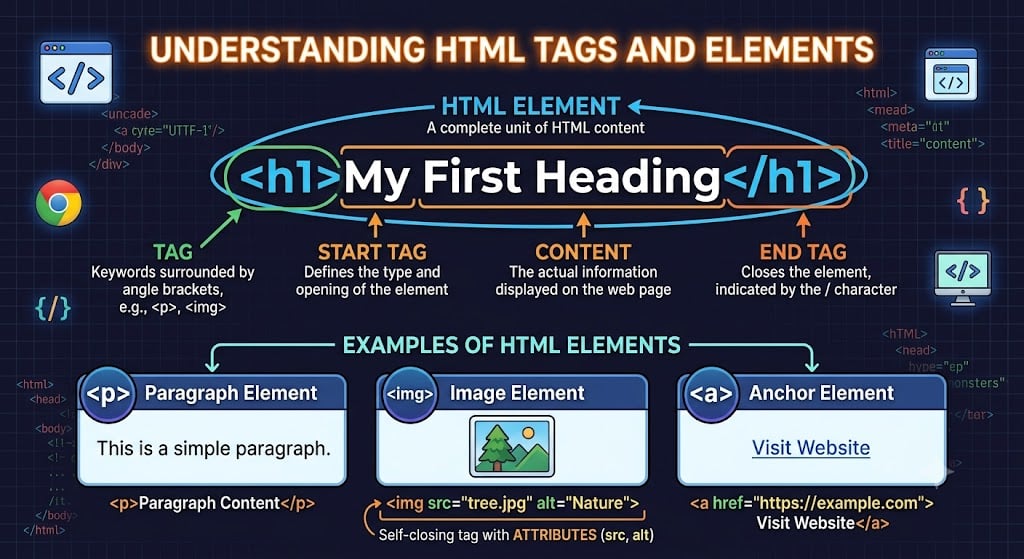
So, in simple words: An HTML tag is a special keyword inside < > that tells the browser what kind of content we want to display.
3. Opening Tag, Content and Closing Tag
Let's take a very simple example:
<p>I am learning HTML</p>
There are three important parts here:
<p>     I am learning HTML     </p>
 ↑              ↑                ↑
Opening        Content          Closing
  Tag                              Tag
Opening Tag
<p>
This tells the browser:
“A paragraph starts from here.”
Content
I am learning HTML
This is the actual content that will appear on the web page.
Closing Tag
</p>
This tells the browser:
“The paragraph ends here.”
The main difference I noticed between opening and closing tags is the /.
<p>  → Opening tag

</p> → Closing tag
4. What is an HTML Element?
This was one thing that confused me initially:
Is a tag and an element the same thing?
They are related, but they are not exactly the same.
Let's look at this:
<p>Hello World</p>
Here:
<p>  → Tag

</p> → Tag
But this complete thing:
<p>Hello World</p>
is an HTML element.
So we can understand it like this:
Opening Tag + Content + Closing Tag = HTML Element