Understanding Variables and Data Types in JavaScript
When I started learning JavaScript, I often saw variables in almost every code example. Initially, I knew how to write them, but I wanted to understand why we actually need them and how they work.
So, in this blog, I am sharing what I learned about variables and data types in JavaScript in a simple way.
1. What are Variables?
A variable is a named place where we can store a value and use it later in our program.
Think of a variable like a box. We can keep something inside a box and give that box a name so we can find it whenever we need it.
For example, imagine you want to store your name, age, and city. Instead of writing these values again and again, you can store them in variables.
let name = "Nandani";
let city = "Delhi";

console.log(name);
console.log(city);
Output:
Nandani
Delhi
Let's understand the first line:
let name = "Nandani";
letis the keyword used to declare the variable.nameis the variable name.=is the assignment operator. It assigns a value to the variable."Nandani"is the value stored in the variable.
Now, whenever we write console.log(name), JavaScript displays the value stored in name.
2. Why Do We Need Variables?
Variables help us store information, reuse values, and make our code easier to manage.
For example, if we want to update someone's age, we can change the value of a variable instead of searching through the entire code and changing every occurrence of that age.
Variables are useful when working with user details, prices, scores, form data, and many other things in a program.
3. How to Declare Variables in JavaScript
JavaScript provides three keywords to declare variables:
1. var
2. let
3. const
All three can be used to declare variables, but they behave differently.
1. var
Definition: var is an older keyword used to declare variables in JavaScript.
We can declare a variable using var and change its value later.
var name = "Nandani";
console.log(name);

name = "Riya";
console.log(name);
Output:
Nandani
Riya
Here, we first stored "Nandani" in the variable name. Later, we changed its value to "Riya".
JavaScript displays the updated value.
We can also redeclare a variable using var within the same scope.
var city = "Delhi";
var city = "Mumbai";

console.log(city);
Output:
Mumbai
The second declaration is allowed, and the variable's value becomes "Mumbai".
However, var has some behaviour related to scope that can sometimes make code confusing. That is why modern JavaScript code generally prefers let and const.
2. let
Definition: let is used to declare a variable whose value may change later.
For example, imagine you are tracking a score in a game. The score can increase as the game continues.
let score = 10;
console.log(score);
score = 20;
console.log(score);
Output:
10
20
Here, the value of score changes from 10 to 20.
Notice that we did not write let again when updating the value. We simply wrote:
score = 20;
This is called reassigning a value.
We can declare a variable using let, but we cannot declare another variable with the same name in the same scope.
let age = 23;

// let age = 24; // Error
However, we can update its value:
let age = 23;

age = 24;
console.log(age); // 24
So, remember that let allows us to change a value, but it does not allow us to redeclare the same variable in the same scope.
3. const
Definition: const is used to declare a variable that cannot be reassigned to another value.
For example, imagine you want to store the name of your country.
const country = "India";
console.log(country);
Output:
India
Now, let's try changing its value.
const country = "India";

country = "Japan";

console.log(country);
This code produces an error because we cannot reassign a variable declared using const.
One important thing to remember is that const does not mean every value inside an object or array becomes unchangeable. It means the variable cannot be reassigned to a different value.
Also, when declaring a const variable, we must assign a value immediately.
This is valid:
const age = 23;
But this is not valid:
const age; // Error
JavaScript gives an error because no initial value was assigned.
4. What Are Data Types in JavaScript?
Definition: A data type tells us what kind of value we are working with.
Think about everyday information. A person's name is text, their age is a number, and whether they are a student can be represented by true or false.
These values are different types of data.
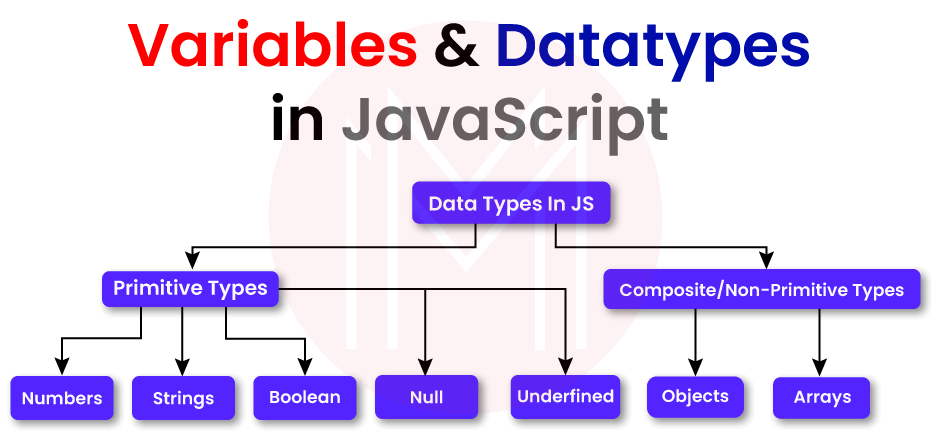
JavaScript has several data types. In this blog, we will focus on the basic ones:
- String
- Number
- Boolean
- Undefined
- Null
Let's understand them one by one
1. String
Definition: A string is used to represent text.
Strings are written inside single quotes (' '), double quotes (" "), or backticks
(` `)
For example:
let name = "Nandani";
let city = "Delhi";

console.log(name);
console.log(city);
Output:
Nandani
Delhi
Here, both values are strings because they contain text.
We can also store numbers as strings.
let age = "23";

console.log(age);
console.log(typeof age);
Output:
23
string
Even though "23" looks like a number, JavaScript treats it as a string because it is written inside quotes.
This difference matters when we perform calculations.
For example:
console.log(10 + 5);     // 15
console.log("10" + "5"); // 105
In the first example, JavaScript adds two numbers.
In the second example, it joins two strings together. This is called concatenation.
2. Number
Definition: The number data type is used to represent numeric values.
It includes positive numbers, negative numbers, integers, and decimal numbers.
For example:
let age = 23;
let price = 99.5;
let temperature = -5;

console.log(age);
console.log(price);
console.log(temperature);
Output:
23
99.5
-5
We can perform mathematical operations using numbers.
let firstNumber = 10;
let secondNumber = 5;

console.log(firstNumber + secondNumber);
console.log(firstNumber - secondNumber);
console.log(firstNumber * secondNumber);
console.log(firstNumber / secondNumber);
Output:
15
5
50
2
Here, JavaScript performs addition, subtraction, multiplication, and division.
Numbers are useful for calculations such as prices, ages, quantities, and scores.
3. Boolean
Definition: A Boolean is a data type that has only two possible values: true or false.
It is useful when we want to represent a condition or a yes/no situation.
For example:
let isStudent = true;
let isLoggedIn = false;

console.log(isStudent);
console.log(isLoggedIn);
Output:
true
false
Here, isStudent is true, which means the value represents that the person is a student.
isLoggedIn is false, which means the user is not currently logged in according to this variable.
We can also get Boolean values by comparing numbers.
let age = 23;

console.log(age >= 18);
Output:
true
The expression age >= 18 checks whether the age is greater than or equal to 18.
Since 23 is greater than 18, the result is true.
Boolean values are commonly used in conditions, login systems, form validation, and other parts of web development.
4. Undefined
Definition: undefined is the value JavaScript gives to a declared variable that has not been assigned a value.
For example:
let hobby;

console.log(hobby);
Output:
undefined
Here, we declared a variable named hobby, but we did not assign any value to it.
That is why JavaScript returns undefined.
Now, let's assign a value to it.
let hobby;

hobby = "Reading";

console.log(hobby);
Output:
Reading
After assigning a value, the variable no longer contains undefined.
We can also check its type:
let hobby;

console.log(typeof hobby);
Output:
undefined
This is a simple example of how JavaScript handles a variable whose value has not been assigned.
5. Null
Definition: null represents the intentional absence of a value.
In simple words, we can assign null when we want to indicate that a value is currently empty or unavailable.
For example:
let selectedColor = null;

console.log(selectedColor);
Output:
null
Imagine a website where a user can select a favourite color. Before the user selects anything, we might use null to represent that no color has been selected yet.
Later, the user selects blue.
let selectedColor = null;

selectedColor = "Blue";

console.log(selectedColor);
Output:
Blue
Now the variable contains a color instead of null.
Difference Between undefined and null
Initially, undefined and null may look similar because both can represent the absence of a useful value. However, their meanings are different.
undefined |
null |
|---|---|
| Often means a value has not been assigned. | Represents an intentional absence of a value. |
| JavaScript commonly produces it automatically in certain situations. | Developers often assign it intentionally. |
Example: let age; |
Example: let age = null; |
Let's compare them:
let firstName;
let lastName = null;

console.log(firstName); // undefined
console.log(lastName);  // null
In the first case, no value has been assigned to firstName.
In the second case, we deliberately assigned null to lastName.
One interesting detail: JavaScript returns "object" when we use typeof null. This is a historical quirk of JavaScript.
console.log(typeof null);      // "object"
console.log(typeof undefined); // "undefined"
Although typeof null returns "object", null is treated as a primitive value in JavaScript.
5. What Is Scope in JavaScript?
Definition: Scope tells us where a variable can be accessed in our code.
In simple words, scope defines the area in which a variable is available for use.
Think of it like different rooms in a house. Something kept in one room may not be available in another room.
JavaScript has different kinds of scope. For beginners, let's understand global scope, function scope, and block scope.
1. Global Scope
Definition: A variable declared outside a function or block can be available to different parts of the program, depending on where it is declared.
For example:
let message = "Hello JavaScript";

function greet() {
  console.log(message);
}

greet();
Output:
Hello JavaScript
Here, message is declared outside the function.
The greet() function can access it because the variable is available in the surrounding scope.
We can also access it outside the function:
let message = "Hello JavaScript";

function greet() {
  console.log(message);
}

greet();
console.log(message);
Both calls to console.log() display "Hello JavaScript".
This example shows how a variable declared outside a function can be accessed from inside that function and from the surrounding code.\
2. Function Scope
Definition: A function-scoped variable is available within the function where it is declared.
Variables declared using var inside a function follow function scope.
For example:
function showAge() {
  var age = 23;
  console.log(age);
}
showAge();
Output:
23
The variable age is available inside showAge().
But what happens if we try to access it outside the function?
function showAge() {
  var age = 23;
}

showAge();
console.log(age); // Error
This produces a ReferenceError because age was declared inside the function and cannot be accessed from outside it.
This is called function scope.
3. Block Scope
Definition: Block scope means that a variable is available only inside the block where it is declared and within its nested scopes.
A block is usually written using curly braces {}.
For example:
if (true) {
  let city = "Delhi";
  console.log(city);
}
Output:
Delhi
Here, city is declared inside the if block using let.
We can access it inside the block.
But if we try to access it outside the block, JavaScript gives an error.
if (true) {
  let city = "Delhi";
}

console.log(city); // Error
This happens because city is block-scoped.
The same rule applies to variables declared with const.
if (true) {
  const country = "India";
  console.log(country);
}
The variable country can be accessed inside the block, but not outside it.
What About var Inside a Block?
This is where var behaves differently from let and const.
if (true) {
  var language = "JavaScript";
}

console.log(language);
Output:
JavaScript
Here, language is accessible outside the if block because var is not block-scoped.
However, remember that var declared inside a function is still limited to that function.
This is an important difference between var and the modern let and const keywords.
Comments
Join the discussionNo comments yet. Be the first to comment.